
Product · inside the instrument
A salesperson in the aisle.
A ledger in the back office.
Two surfaces, one grounded loop. The shopper speaks to their own phone. The retailer sees the question, the code and the till match in Sage.
The loop
Shelf → phone → catalogue → conversation → till
No app · No hardware · No card data
Chapter
01
The shopper surface
A conversation, not a search box.
The shopper scans a code and speaks in their own language. The agent asks about the job to be done, ranks the catalogue, and keeps the trade-offs in view. No install, account or queue.
The shopper surface
The phone assists. The till sells.
A browser session opens from the code. The shopper can type or talk, and the same agent answers either way. Price and stock are rendered from the live catalogue, not recalled by the model.
- Voice or text, one agent
- The bundle surfaced in context
- Handover carries the conversation
The shopper keeps their phone. The retailer keeps their POS.
In the shopper’s hand
Demo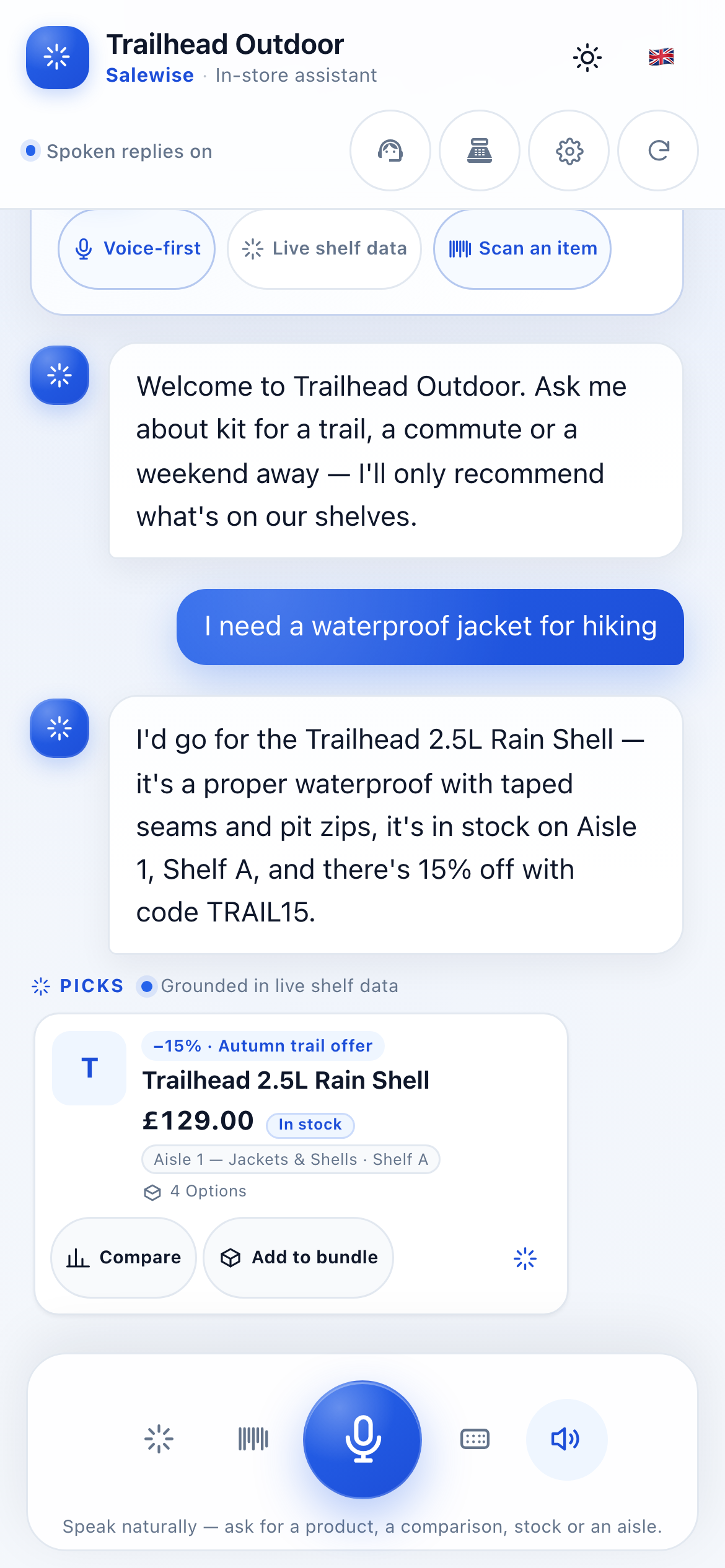
Voice or text
Ask it out loud.
Tap the mic or type. The same agent answers either way, on the shopper’s own phone.
The warm handover
A person takes the moment that matters.
The merchant sets the handover point. The full conversation goes with the shopper to the associate.
Conversation attached →
29
languages supported
All 29 are enabled in the demo, with a language picker and right-to-left support.
Bundles, in context
The add-on belongs to the answer.
Accessories and compatible items appear in the conversation, not as a generic recommendation rail.
Out-of-hours cover
The same answers on the Sunday shift.
The agent does not clock off. The merchant still sets what it may answer and when a person takes over.
Chapter
02
The grounding line
The catalogue speaks first.
Retrieval happens before generation. The model may select a product ID and write a rationale; it may not write a price, a stock level or a policy.
The grounding line
Retrieval before generation- 01
Query
The shopper asks in plain language.
- 02
Retrieve
The server selects candidate products.
- 03
Select
The model chooses IDs and a rationale.
- 04
Validate
IDs outside the candidate set are dropped.
- 05
Render
The server writes price, stock and variants.
Server-rendered record
SKU · T5-014Trail 5K Pack
- Price
- £39.00
- Stock
- 6 in store
- Sizes
- UK 6–12
Illustrative record · rendered at request
Rejected ID
Outside the candidate set.
The model selected a product the server did not retrieve. The ID is discarded before the answer is rendered.
ID not in retrieved set
The model’s limits
It never writes a price.
It never writes a stock level.
It never writes a variant.
It never writes a policy.
0
open-web lookups
The merchant's live catalogue is the only source.
by design
100%
price and stock rendered server-side
By architecture, not by prompt.
by design
01
Retrieval first
The server retrieves candidate products from the merchant's catalogue before the model is asked anything. The model never searches the open web.
02
The model selects. The server renders.
Prices, stock, variants and offers are rendered server-side from catalogue records. A number in the model's prose is never the source of truth.
03
IDs are validated
Every product the model selects must exist in the retrieved candidate set. Invalid IDs are discarded before the answer reaches the shopper.
04
Honest refusal
If the catalogue does not contain an answer, the agent says so and offers a handover. If the model is unavailable, the assistant says it cannot answer and the shopper can try again or ask a colleague.
Chapter
03
The QR manager
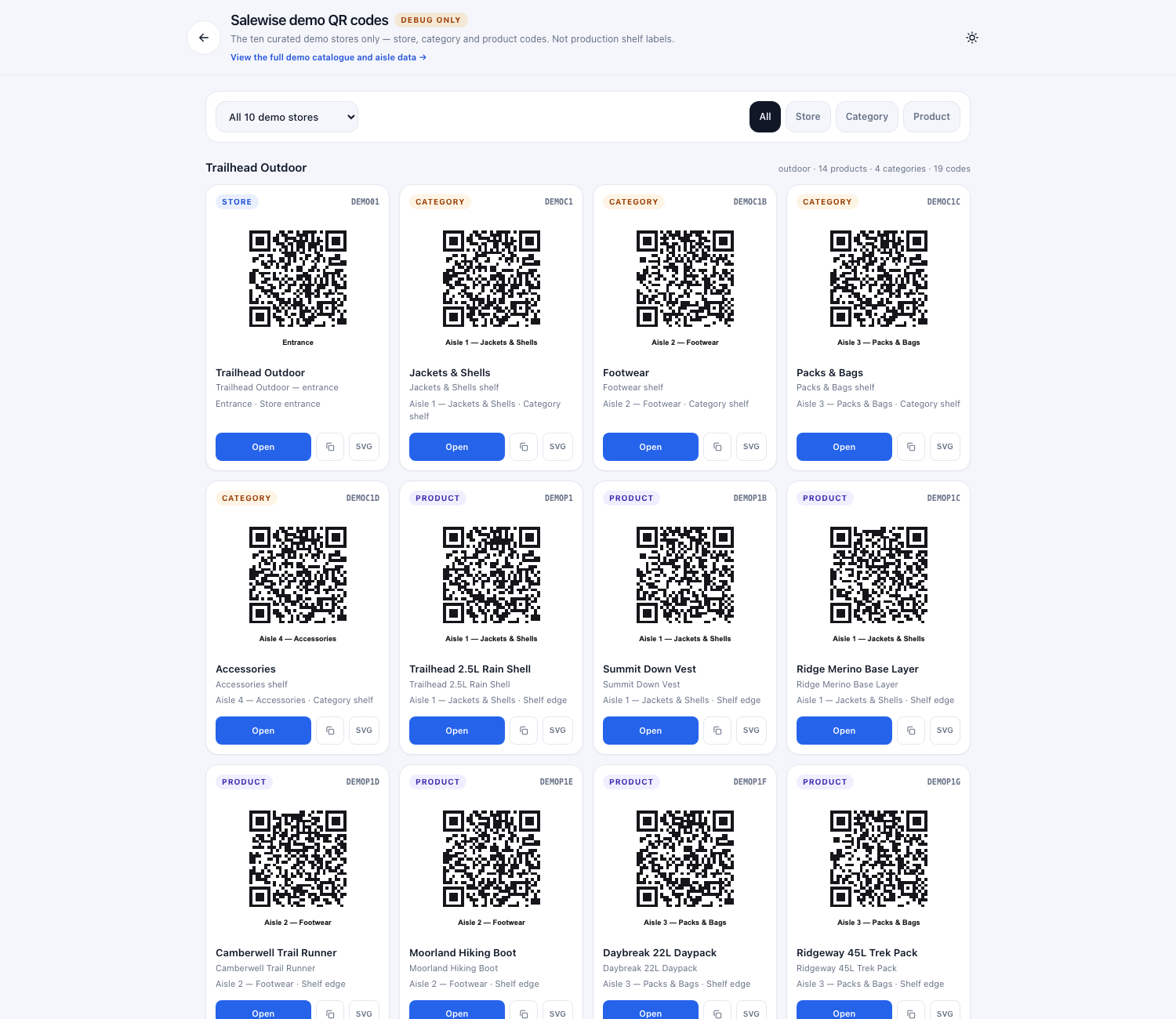
A code with a job, not a sticker.
Name a code by aisle, target a category or product, style it in your colours, and download SVG or PNG. Disable it without losing the scans it earned.
Salewise
Aisle 1Ask about running.
Scan · ask · compare · pay at the till
Illustrative shelf card. The code resolves to the demo catalogue.
QR manager · illustrative
Active- Label
- Aisle 1 · Running
- Target
- Category · Running
- Design
- H · logo “SW”
- Export
- SVG · PNG · print card
Usage per code
Illustrative weekEntrance · store
Entrance
412 scans · 188 questions · 41 handoffs
ActiveAisle 1 · gift
Aisle 1
268 scans · 96 questions · 12 handoffs
ActiveAisle 2 · running
Aisle 2
203 scans · 74 questions · 9 handoffs
PausedIllustrative console. Codes are disabled rather than deleted, so scan history survives.
A code is not a campaign. It belongs beside the decision.
Shelf edge, display, counter or bench — named by the aisle it serves.
Design controls
Colours, logo and caption, validated.
The console validates colour, logo type and size before rendering the SVG and PNG.
Usage per code
Every code earns its own record.
Scans, sessions, questions, answers and handoffs are recorded per aisle and per code.
Chapter
04
The conversation record
What the aisle actually asked.
Every session is tagged with the code and aisle that started it. The merchant sees the question, the answer, the products recommended and the handover — not a dashboard of anonymous clicks.
Session 014 · Aisle 2
Voice · English
For a first half, the daily trainer is the better fit. It has more cushioning for the distance; the tempo shoe is lighter but firmer.
Road Trainer 2
£110 · UK 9 in stock
Tempo Trainer
£125 · UK 9 in stock
Price and stock rendered at request · illustrative catalogue
Aisle 2 · one week
Illustrative203
Scans
74
Questions
9
Handoffs
Figures are not from a merchant. They show the shape of the record.
Handoff queue
Gait analysis · Aisle 2
“Which shoe is better for a first half?”
Needs a person
Warranty claim · Service desk
“The left earbud has stopped charging.”
Model collected the issue
Every shopper question and agent answer is tagged with the QR code and aisle that started the session.
Chapter
05
The till link
A line to the till, with the join showing.
Attribution is a match between a conversation and a sale. The merchant can see whether it is exact or modelled, and what the confidence is.
The link
Session → sale01
Scan
The QR code tags the session with a store, aisle and time.
02
Ask
The question, products retrieved and recommendations are logged.
03
Redemption
The agent offers a short code tied to the session.
04
Till
The sale is recorded in Sage. The match is exact or labelled modelled.
Exact match
1.00
A redemption code carried from the session to the sale. Modelled is false.
Modelled ceiling
≤ 0.92
A same-store basket overlap inside a two-hour window, labelled modelled wherever it is reported.
The method, confidence and time window are stored with the match. The merchant can audit the join.
Tier 1 · deterministic
Confidence 1.0Redemption code
The sale carries the code from the session. This is an exact match: modelled false, attributed outright. It is the strongest link between a conversation and a transaction.
Tier 2 · modelled
Confidence ≤ 0.92Basket overlap
Without a code, the system looks for a same-store sale within two hours that contains items the agent recommended. The match is always labelled as modelled in merchant reporting.
Why it matters
A redemption code gives an exact match. Otherwise a time-windowed basket overlap is reported as modelled, never as fact.
Every match stores its method, confidence and time window. Exact matches are exact. Modelled matches are labelled everywhere they appear. The merchant can audit the join; attribution is not a revenue line, and the subscription is the only fee.
Chapter
06
The honest label
Live means live.
Adapters are labelled by what is usable today, not by what is on a roadmap slide. The same rule applies to the agent's boundaries.
Capability labels
26 adapters · 5 usableLive
1Available to merchants today.
- Salewise
Native master-key integration. Available today.
Beta
4Adapter built and in merchant testing.
- Shopify POS
Catalogue, stock and locations sync across Shopify stores. Orders are not synced yet.
- Square
Catalogue, stock and locations for Square sellers. Orders are not synced yet.
- Epos Now
EPOS catalogue and sales import.
- WooCommerce
WordPress catalogue, stock and location sync. Orders are not synced yet.
Coming soon
21Planned or in development. Not available to merchants today.
- Lightspeed X-Series (Vend)
- Zettle by PayPal
- Clover
All 21 planned adapters
- Lightspeed X-Series (Vend)
- Zettle by PayPal
- Clover
- SumUp Payments
- SumUp POS (Goodtill)
- BigCommerce
- Lightspeed R-Series
- Loyverse
- ERPLY
- Heartland Retail
- Adobe Commerce (Magento)
- PrestaShop
- Revel Systems
- Toast
- TouchBistro
- NewStore
- Mercaux
- Bepoz
- Ascend Retail
- Odoo POS
- Microsoft Dynamics 365 Commerce
Live means the adapter is available to merchants today. Beta means the adapter is built and in merchant testing. Coming soon means the adapter is planned or in development and is not available to merchants today. 26 adapters are in the registry; 5 are usable now.
Talk about your POSThe edges
What Salewise does not do.
- 01
Payments on the shopper's phone. Transactions stay with your POS.
- 02
A replacement for store staff. The agent routes the moments that matter to people.
- 03
Custom integration engineering. New adapters are scoped and agreed separately.
- 04
Commission on attributed sales. The subscription is the only fee.
- 05
It does not answer from the open web, a supplier PDF or the model's memory.
- 06
It does not install an app on the shopper's phone.
- 07
It does not replace a pharmacist, mechanic, clinician or any regulated adviser.
See the surfaces
Open the demo. Then trace it back.
Scan the code, ask a question, compare two products, and watch the session land in the record.